
Description
====================================================================
TECHNICAL SPECIFICATIONS & FEATURES
====================================================================
TOOL NAME: KinemaFlow V1.0
SUBTITLE: Tool for plotting between FK/IK & Workflow Suite
AUTHOR: Animframe
SUPPORTED MAYA VERSIONS: Maya 2022, 2023, 2024, 2025,2026,2027 (Python 3.x environments)
⚠️ RIG COMPATIBILITY NOTE: KinemaFlow is highly versatile and designed to work seamlessly out-of-the-box with the vast majority of standard and professional Maya rigs. However, due to the infinite variations in custom rigging techniques, scripts, and non-standard naming conventions, it may not automatically support 100% of the custom rigs out there.
CORE FEATURES (FK/IK ENGINE):
• Seamless FK/IK Matching: Accurately converts poses between Forward
Kinematics and Inverse Kinematics, ensuring a smooth and highly
reliable transition for animators.
• Stable Transitions: Built to maintain correct control orientations
during complex limb twists, significantly reducing common “broken
wrist” and axis-flipping issues.
• Reliable Baking Engine: Safely processes frame-by-frame animation
loops to bake entire sequences effortlessly, without disrupting the
rig’s internal evaluation.
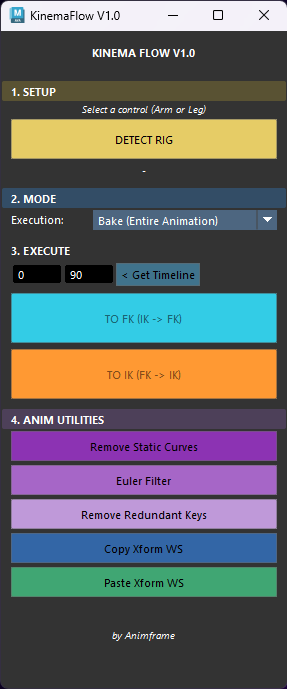
• Intelligent Rig Detection: Automatically identifies limb controls
(Arms/Legs) and sides (Left/Right) with a single click, streamlining
the animator’s setup process.
ADVANCED WORKFLOW SUITE:
• World Space Xform (Copy/Paste): A high-performance spatial memory
system. It allows animators to copy a control’s absolute World Space
position and paste it flawlessly across different parent spaces
(e.g., maintaining a locked pose while switching a Global space
attribute from 0 to 10).
• Clean & Instant Execution: The Copy/Paste engine operates invisibly
and instantaneously, maintaining a clean scene without generating
temporary locators or messy constraints in your Outliner.
• Unified Undo System: Entire batch operations (like baking or pasting
across hundreds of frames) are safely grouped together. A single
‘Ctrl+Z’ effortlessly undoes the entire process.
• Smart Timeline & Channel Box Sync: The Paste function automatically
adapts to the highlighted timeline selection and intelligently filters
its execution based on the active attributes selected in the Maya
Channel Box.
• Curve Cleanup Utilities: Includes one-click solutions to remove
static curves, apply Euler Filters, and a custom “Remove Redundant
Keys” tool that forcefully snaps all remaining keys to whole integers,
completely preventing decimal frame offsets.
Video Demo
“Happy animating! Click on the AnimFrame profile name to check out the store and stay tuned for future tools!”
Developed and heavily tested on Windows.
⚠️ Copyright & License Information © AnimFrame. All rights reserved.
This tool and its underlying code are protected by copyright. By purchasing KinemaFlow, you acquire a single-user license for personal or commercial projects.
Unauthorized distribution, sharing, repackaging, or reselling of this script, in whole or in part, is strictly prohibited. Thank you for respecting the hard work that goes into indie tool development!



Reviews
There are no reviews yet.